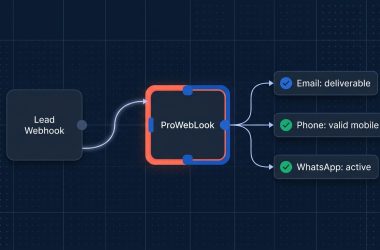

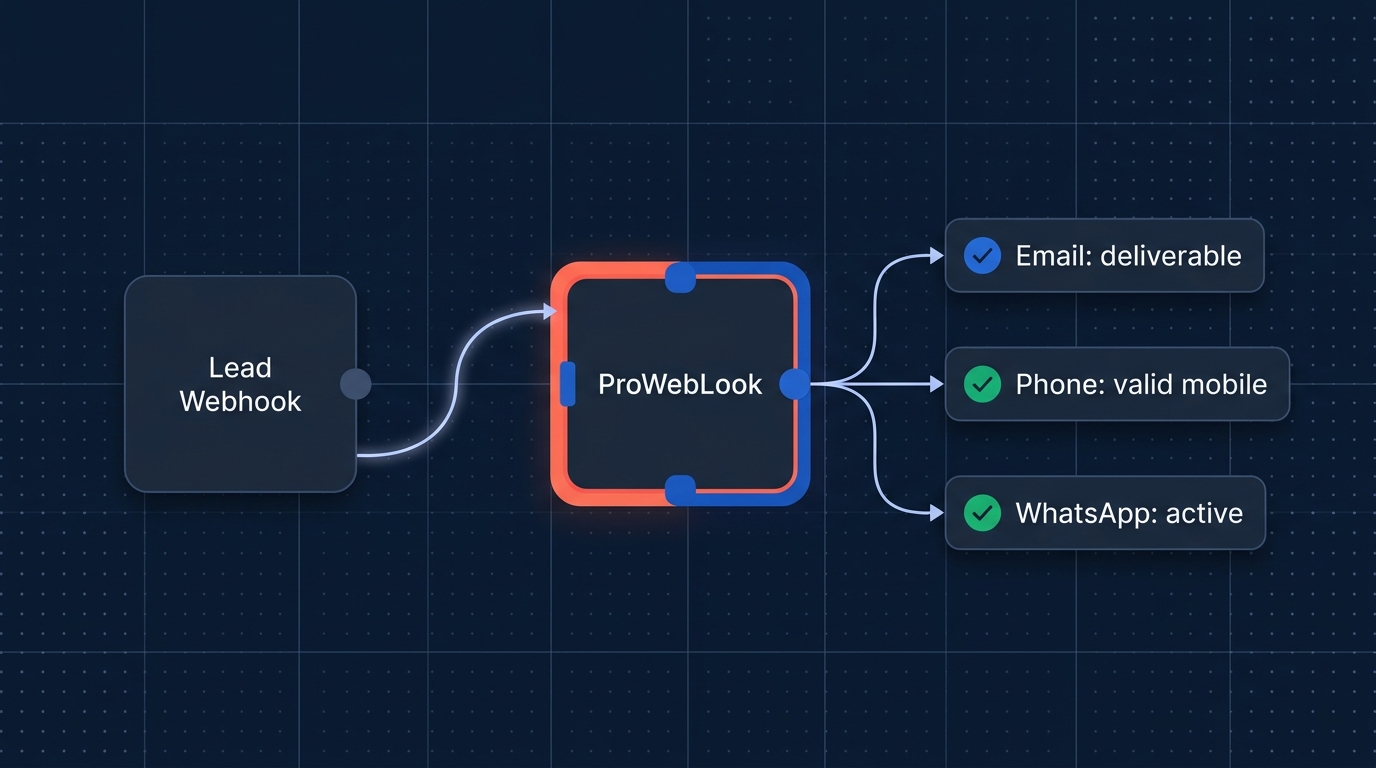
Quick Takeaway: The official verified n8n-nodes-proweblook package is now live for both n8n Cloud and self-hosted n8n. Instead of wiring brittle HTTP Request nodes, custom headers, and error parsers by hand, you can drop a single native ProWebLook node onto your canvas to verify email deliverability, inspect phone carrier & VoIP line types, check WhatsApp registration silently, and monitor your credit pools in real time.
Bad contact data quietly poisons every downstream automation you build: bounced cold outreach damages sender reputation, mistyped checkout numbers trigger Cash-on-Delivery (COD) Return-to-Origin losses, and unverified WhatsApp numbers stall conversational sales sequences. With ProWebLook for n8n, your workflows validate every email and phone number before writing to HubSpot, Pipedrive, Google Sheets, Shopify, or Slack.
What You Can Do with n8n-nodes-proweblook
Version 0.1.0 of the verified ProWebLook n8n integration ships four declarative operations under a single ProWebLook node, authenticated once with your ProWebLook API key:
| Operation | Internal Value | Credit Cost | What It Returns |
|---|---|---|---|
| Verify Email | verify_email | 1 Email credit per completed verdict | email, verdict (deliverable, undeliverable, risky, unknown), reason, billing_status |
| Validate Phone | validate_phone | Up to 1 Phone credit per lookup | verdict, details.formatted_number (E.164), details.linetype (Mobile, Landline, VoIP), details.countrycode |
| Validate WhatsApp | check_whatsapp | Up to 1 WhatsApp credit per lookup | verdict (on_whatsapp / not_on_whatsapp), details.numberstatus, details.businessnumber — sends zero messages or OTPs |
| Get Balances | get_balance | Free (0 credits) | Real-time amount and unlimited flags across email, phone, and whatsapp credit pools |
New to ProWebLook? Create a free ProWebLook account to receive 50 free credits each across Email, Phone, and WhatsApp so you can test every operation in n8n immediately.
Step 1: Install n8n-nodes-proweblook in n8n
Option A: Install on n8n Cloud or via the n8n Canvas UI (Recommended)
- Open your n8n instance and navigate to Settings → Community Nodes (or search directly inside the canvas Nodes panel for verified nodes).
- Click Install a community node.
- Enter the exact npm package name:
n8n-nodes-proweblook - Check the acknowledgment box and click Install. Within a few seconds, ProWebLook appears in your node palette.
Option B: Self-Hosted Docker / Queue Mode Environments
If you run self-hosted n8n with Community Nodes enabled (N8N_COMMUNITY_PACKAGES_ENABLED=true, which is enabled by default), the GUI installer above works out of the box. For immutable Docker builds or queue-mode workers where custom nodes are pre-installed in ~/.n8n/nodes, run:
mkdir -p ~/.n8n/nodes && cd ~/.n8n/nodes
npm install n8n-nodes-proweblook
# Restart your n8n container or worker processes afterward
Step 2: Connect Your ProWebLook API Credential
- Sign in to your ProWebLook Dashboard (or sign up free) and copy your API Key.
- On your n8n canvas, add a ProWebLook node and open the Credential to connect with dropdown → Create new credential.
- Paste your API key into the API Key field and click Save.
Zero-credit connection test: When you click Save, n8n automatically validates your credential against ProWebLook’s free get_balance endpoint (POST https://proweblook.com/api/v1/n8n/get_balance), confirming authentication without spending a single verification credit.
Step 3: Map Expressions & Inspect Output Verdicts
Each input item arriving at the ProWebLook node executes one deterministic API lookup and returns structured JSON ready for downstream IF or Switch routing. Importantly, negative contact verdicts (such as an undeliverable email or a phone number not_on_whatsapp) return normal JSON items rather than throwing node errors—so a single bad lead never crashes a multi-item batch.
1. Verify Email (verify_email)
Set Operation to Verify Email and map Email to an incoming field such as {{ $json.email }}. Powered by our Email Verification engine, the node returns:
{
  "email": "alex@company.com",
  "verdict": "deliverable",
  "reason": "deliverable",
  "billing_status": "charged"
}
Routing tip: Treat verdict === "deliverable" as safe for automated cold sequences. Catch-all or unknown domains do not prove individual mailbox existence—route those to a secondary manual-review or warm-channel bucket.
2. Validate Phone Carrier & Line Type (validate_phone)
Set Operation to Validate Phone. Pass either a full international E.164 number (+12025550123) with Country Code left blank, or a national number (2025550123) paired with a two-letter ISO Country Code (US, IN, GB). Powered by the Phone Number Validator API:
{
  "verdict": "valid",
  "reason": "completed",
  "billing_status": "upstream_managed",
  "details": {
    "status": "VALID_CONFIRMED",
    "formatted_number": "+12025550123",
    "linetype": "Mobile",
    "countrycode": "US"
  }
}
3. Validate WhatsApp Silently (check_whatsapp)
Set Operation to Validate WhatsApp and pass an E.164 phone string starting with + (for example, {{ $json.details.formatted_number }} from a preceding Validate Phone step or {{ $json.phone }}). Using ProWebLook’s WhatsApp Number Checker, this lookup verifies registration silently without sending any message or OTP:
{
  "verdict": "on_whatsapp",
  "reason": "completed",
  "billing_status": "upstream_managed",
  "details": {
    "numberstatus": true,
    "businessnumber": false
  }
}
Production Best Practices to Protect Your Credits
- Keep
Retry On Failturned OFF: Paid verification operations execute one live lookup per item. Enabling automatic retries or re-running failed branches blindly can consume another credit if an upstream network timeout occurred after processing started. - Keep phone numbers as strings: Spreadsheets and CSV parsers frequently strip leading
+signs or leading zeros when casting phone numbers to integers. Wrap expressions withString(...)and always preserve the+prefix forcheck_whatsapp. - Gate expensive steps sequentially: Verify email deliverability first (1 Email credit), filter with an IF node, and run
check_whatsapponly on leads that passed the email check. - Schedule a daily free balance check: Run
get_balanceon a Schedule Trigger once a morning and alert Slack whenemail.amount,phone.amount, orwhatsapp.amountdrops below your safety threshold.
Ready-to-Paste n8n Workflow JSON Templates
Copy either JSON snippet below, click anywhere on an open n8n workflow canvas, and press Cmd+V (macOS) or Ctrl+V (Windows/Linux) to import the complete node graph instantly. Both workflows ship inactive with zero embedded credentials and retryOnFail: false.
Template 1: Two-Stage Inbound Lead Gate (Email → IF → WhatsApp)
{
  "name": "ProWebLook Lead Gate: Verify Email & WhatsApp",
  "nodes": [
    {
      "parameters": {},
      "id": "b1f2f001-1111-4000-8000-000000000001",
      "name": "When clicking 'Execute workflow'",
      "type": "n8n-nodes-base.manualTrigger",
      "typeVersion": 1,
      "position": [
        0,
        0
      ]
    },
    {
      "parameters": {
        "assignments": {
          "assignments": [
            {
              "id": "a1",
              "name": "email",
              "value": "alex@example.com",
              "type": "string"
            },
            {
              "id": "a2",
              "name": "phone_e164",
              "value": "+12025550123",
              "type": "string"
            }
          ]
        },
        "options": {}
      },
      "id": "b1f2f001-1111-4000-8000-000000000002",
      "name": "Sample Lead Input",
      "type": "n8n-nodes-base.set",
      "typeVersion": 3.4,
      "position": [
        220,
        0
      ]
    },
    {
      "parameters": {
        "operation": "verify_email",
        "email": "={{ $json.email }}"
      },
      "id": "b1f2f001-1111-4000-8000-000000000003",
      "name": "Verify Email Deliverability",
      "type": "n8n-nodes-proweblook.proWebLook",
      "typeVersion": 1,
      "position": [
        460,
        0
      ],
      "retryOnFail": false
    },
    {
      "parameters": {
        "conditions": {
          "options": {
            "caseSensitive": true,
            "leftValue": "",
            "typeValidation": "strict",
            "version": 2
          },
          "conditions": [
            {
              "id": "c1",
              "leftValue": "={{ $json.verdict }}",
              "rightValue": "deliverable",
              "operator": {
                "type": "string",
                "operation": "equals"
              }
            }
          ],
          "combinator": "and"
        },
        "options": {}
      },
      "id": "b1f2f001-1111-4000-8000-000000000004",
      "name": "Is Email Deliverable?",
      "type": "n8n-nodes-base.if",
      "typeVersion": 2.2,
      "position": [
        700,
        0
      ]
    },
    {
      "parameters": {
        "operation": "check_whatsapp",
        "phoneNumber": "={{ $('Sample Lead Input').item.json.phone_e164 }}"
      },
      "id": "b1f2f001-1111-4000-8000-000000000005",
      "name": "Check WhatsApp Registration",
      "type": "n8n-nodes-proweblook.proWebLook",
      "typeVersion": 1,
      "position": [
        940,
        -60
      ],
      "retryOnFail": false
    }
  ],
  "connections": {
    "When clicking 'Execute workflow'": {
      "main": [
        [
          {
            "node": "Sample Lead Input",
            "type": "main",
            "index": 0
          }
        ]
      ]
    },
    "Sample Lead Input": {
      "main": [
        [
          {
            "node": "Verify Email Deliverability",
            "type": "main",
            "index": 0
          }
        ]
      ]
    },
    "Verify Email Deliverability": {
      "main": [
        [
          {
            "node": "Is Email Deliverable?",
            "type": "main",
            "index": 0
          }
        ]
      ]
    },
    "Is Email Deliverable?": {
      "main": [
        [
          {
            "node": "Check WhatsApp Registration",
            "type": "main",
            "index": 0
          }
        ],
        []
      ]
    }
  },
  "active": false,
  "settings": {
    "executionOrder": "v1"
  }
}
Template 2: Checkout Phone Carrier & VoIP Fraud Filter
{
  "name": "ProWebLook Phone Carrier & VoIP Filter",
  "nodes": [
    {
      "parameters": {},
      "id": "c2e3f002-2222-4000-8000-000000000001",
      "name": "When clicking 'Execute workflow'",
      "type": "n8n-nodes-base.manualTrigger",
      "typeVersion": 1,
      "position": [
        0,
        0
      ]
    },
    {
      "parameters": {
        "assignments": {
          "assignments": [
            {
              "id": "p1",
              "name": "phone_number",
              "value": "2025550123",
              "type": "string"
            },
            {
              "id": "p2",
              "name": "country_code",
              "value": "US",
              "type": "string"
            }
          ]
        },
        "options": {}
      },
      "id": "c2e3f002-2222-4000-8000-000000000002",
      "name": "Sample Checkout Phone",
      "type": "n8n-nodes-base.set",
      "typeVersion": 3.4,
      "position": [
        220,
        0
      ]
    },
    {
      "parameters": {
        "operation": "validate_phone",
        "phoneNumber": "={{ $json.phone_number }}",
        "countryCode": "={{ $json.country_code }}"
      },
      "id": "c2e3f002-2222-4000-8000-000000000003",
      "name": "Validate Phone Carrier & Line Type",
      "type": "n8n-nodes-proweblook.proWebLook",
      "typeVersion": 1,
      "position": [
        460,
        0
      ],
      "retryOnFail": false
    },
    {
      "parameters": {
        "conditions": {
          "options": {
            "caseSensitive": false,
            "leftValue": "",
            "typeValidation": "strict",
            "version": 2
          },
          "conditions": [
            {
              "id": "v1",
              "leftValue": "={{ $json.verdict }}",
              "rightValue": "valid",
              "operator": {
                "type": "string",
                "operation": "equals"
              }
            },
            {
              "id": "v2",
              "leftValue": "={{ String($json.details?.linetype || '') }}",
              "rightValue": "voip",
              "operator": {
                "type": "string",
                "operation": "notEquals"
              }
            }
          ],
          "combinator": "and"
        },
        "options": {}
      },
      "id": "c2e3f002-2222-4000-8000-000000000004",
      "name": "Is Valid Non-VoIP Line?",
      "type": "n8n-nodes-base.if",
      "typeVersion": 2.2,
      "position": [
        700,
        0
      ]
    }
  ],
  "connections": {
    "When clicking 'Execute workflow'": {
      "main": [
        [
          {
            "node": "Sample Checkout Phone",
            "type": "main",
            "index": 0
          }
        ]
      ]
    },
    "Sample Checkout Phone": {
      "main": [
        [
          {
            "node": "Validate Phone Carrier & Line Type",
            "type": "main",
            "index": 0
          }
        ]
      ]
    },
    "Validate Phone Carrier & Line Type": {
      "main": [
        [
          {
            "node": "Is Valid Non-VoIP Line?",
            "type": "main",
            "index": 0
          }
        ]
      ]
    }
  },
  "active": false,
  "settings": {
    "executionOrder": "v1"
  }
}
Frequently Asked Questions
Does n8n-nodes-proweblook work on both n8n Cloud and self-hosted n8n?
Yes. Because n8n-nodes-proweblook is a verified declarative community node with zero external runtime dependencies, it works across n8n Cloud workspaces as well as self-hosted Docker, npm, and queue-mode deployments.
Does Validate WhatsApp notify the recipient or send a message?
No. The check_whatsapp operation performs a non-intrusive registration lookup only—it never sends a WhatsApp message, call, or OTP code to your lead.
Does checking my credit balances cost credits?
Never. Both credential testing and the Get Balances (get_balance) operation are completely free, so you can run scheduled balance monitors as often as needed.
Ready to clean every lead and phone number inside n8n? Grab your ProWebLook API key with 50 free Email, Phone & WhatsApp credits → or explore the interactive node inspector at proweblook.com/n8n.